
EstiLumina
Sales & Estimating
Takeoff that lands in the estimate
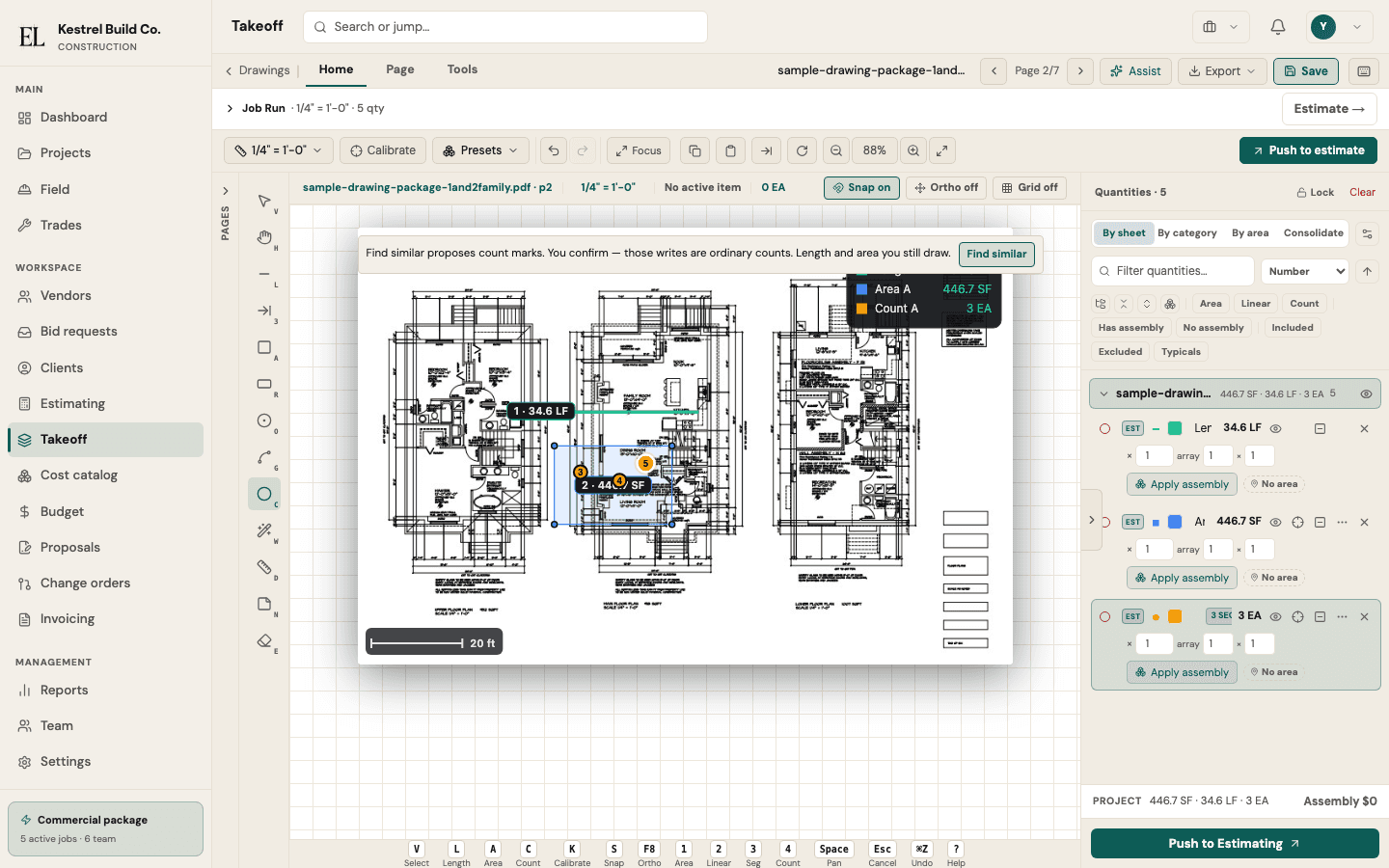
Calibrate from the printed scale, measure with trade presets, review the quantities tree, push to the estimate — on the desk or on an iPad with the Pencil.
You confirm every quantity. Find similar can propose count, length, or area — you confirm before it is a quantity.
The job pressure
Qty lives in a separate digitizer — retyping into the estimate invites drift.
All packages — core of Sales & Estimating
On the job
Construction takeoff software should not end in a CSV you retype into the estimate. On EstiLumina, calibration, trade presets, and depth or height factors live on the same job that will later hold budget, RFQ, and pay applications.
Open a PDF sheet and the scale menu reads the printed scale off the title block — architectural, engineering, or metric — so you confirm instead of typing; sheets that say “as indicated” list their view scales, and a detail drawn at another scale gets its own zone on the same page. Draw lengths, areas, and counts with presets that stick on the next sheet; full-size 35-sheet plan sets upload in resumable chunks and render page by page.
The quantities tree shows every item by sheet or by category with openings, factors, notes, and a legend, and prints as a takeoff report on your letterhead. On an iPad the Apple Pencil draws exactly as a mouse does, a finger pans and pinches, and a resting palm is ignored — put the desk on the Home Screen and the last sheet opens offline.
You confirm every quantity. Find similar can propose count, length, or area — you confirm before it is a quantity. That honesty matters on bid day: the quantity you priced is the quantity the job will run.
How it works
- 1
Open a PDF sheet — the scale menu offers the printed scale from the title block; details drawn at another scale get their own zone.
- 2
Measure length, area, or count with trade presets. Find similar can propose repeats — you confirm.
- 3
Review the quantities tree by sheet or category — openings, depth and height factors, notes, legend.
- 4
Push to estimate, print the takeoff report on your letterhead, or Excel export/import by id.
What you get
- Works on iPad: the Apple Pencil draws, a finger pans and pinches, a held finger opens the menu, a resting palm is ignored
- Printed-scale suggestion from the title block; scale zones for details at another scale on the same sheet
- Quantities tree by sheet or category with openings, depth / height / thickness / pitch factors, notes, and a legend — a roof’s sloped area, a trench’s cubic yards and a floor’s joist count derived beside the quantity you drew
- Find similar for count, length, and area, and Suggest rooms from a vector PDF’s own lines — you pick and confirm; nothing writes until you do
- Dense plan sets: 100 MB resumable uploads, full-size 35-sheet sets rendered like a desk should
- Push to estimate, takeoff report with your letterhead, Excel qty round-trip (export/import)
Why teams subscribe
- Quantities land in the estimate without retyping
- The same sheet, the same tools, on a Mac at the desk and an iPad on site
- A takeoff report the client can read, on your letterhead
Honest boundaries
- Not automatic takeoff that draws for you.
- Not a CAD or BIM modeling engine — 2D PDF/image takeoff only.
- Not a native App Store app — the iPad desk is the same web app, installed from Safari.
Put this on your next job