
EstiLumina
Customer Experience
Owner portal
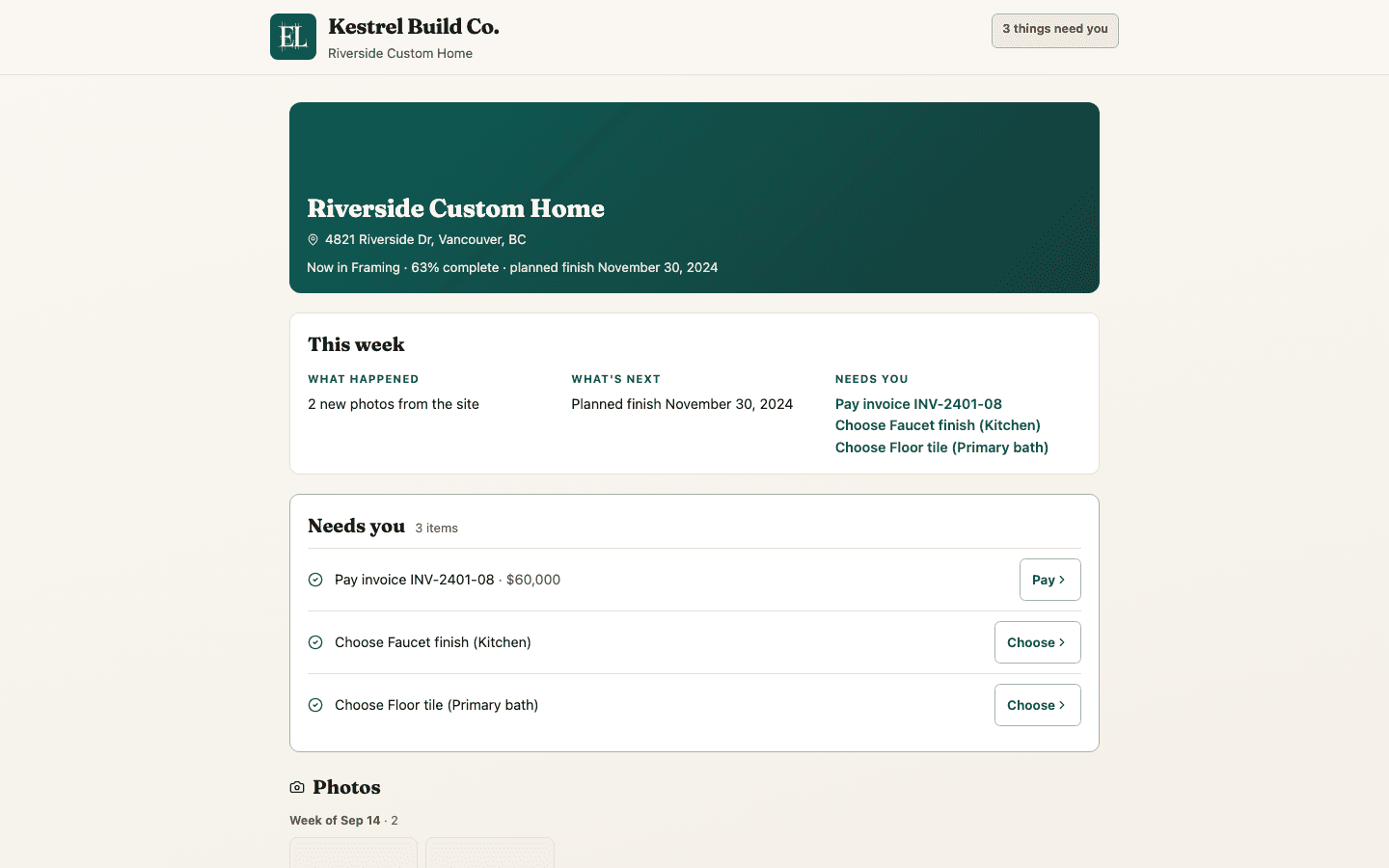
A home screen the homeowner understands on their phone: this week, what needs them, photos by week, selections with product photos, the money in your builder's own numbers, the schedule in milestones — on your letterhead.
The job pressure
Owners want status, selections, and payments without a shared password or a second login to remember — and a page that reads like their home, not your office.
All packages — owners on a link do not use a paid login
On the job
Owners want clear status, selections, and payments without a shared password. EstiLumina lets you choose what they see, Preview as the owner, then invite by email — they open the project with a sign-in link, no app to download.
Their home screen is built for a phone in the evening: the latest site photo as the cover, this week in three short lists — what happened, what is next, what needs you — then the decisions waiting with one verb each, photos by week, selection boards with product photos and links, and the money in the same arithmetic your job home shows: agreed, approved changes, invoiced, paid, due now. Below that the schedule in milestones, the documents you shared, the site diary and a place to write to you.
Approvals, payments, and picks return to the job so the numbers stay honest for the builder. A homeowner who wants less checking turns on the weekly summary — Monday mornings, only when something happened or something needs them.
How it works
- 1
Choose what they see, then Preview as the owner before you invite.
- 2
Invite by email — they open the project with a sign-in link (no app to download).
- 3
Their home screen leads with this week and what needs them; they pick finishes, sign changes, pay, and leave notes.
- 4
Selection overage becomes a change you draft; they approve and pay in the same project — and can ask for a weekly email.
What you get
- Home screen: cover photo, this week (what happened · what's next · needs you), decisions with one verb each
- Photos by week, selection boards with product photos and links, decide-by dates, write-in suggestions
- Money in the office's own arithmetic — agreed, changes, invoiced, paid, due now — plus the payment plan and pay online
- Schedule as milestones (done · underway · coming up), documents, site diary, notes to the builder
- Weekly summary email the homeowner turns on — Monday mornings, only when something changed
- Choose what they see, Preview as owner, sign-in by email, your letterhead accent; prints clean
Why teams subscribe
- You preview the portal before the owner sees it
- Selections close into signed changes and cash
- Friday status calls get quieter — progress and Needs-you are clear
Honest boundaries
- Not a public listing portal for buyers who are not your clients.
- Not a claim that homeowners need a paid EstiLumina seat.
Put this on your next job